The financial report
Screen: Financial report, address /finances/report. Every movement of money over a
period, line by line.
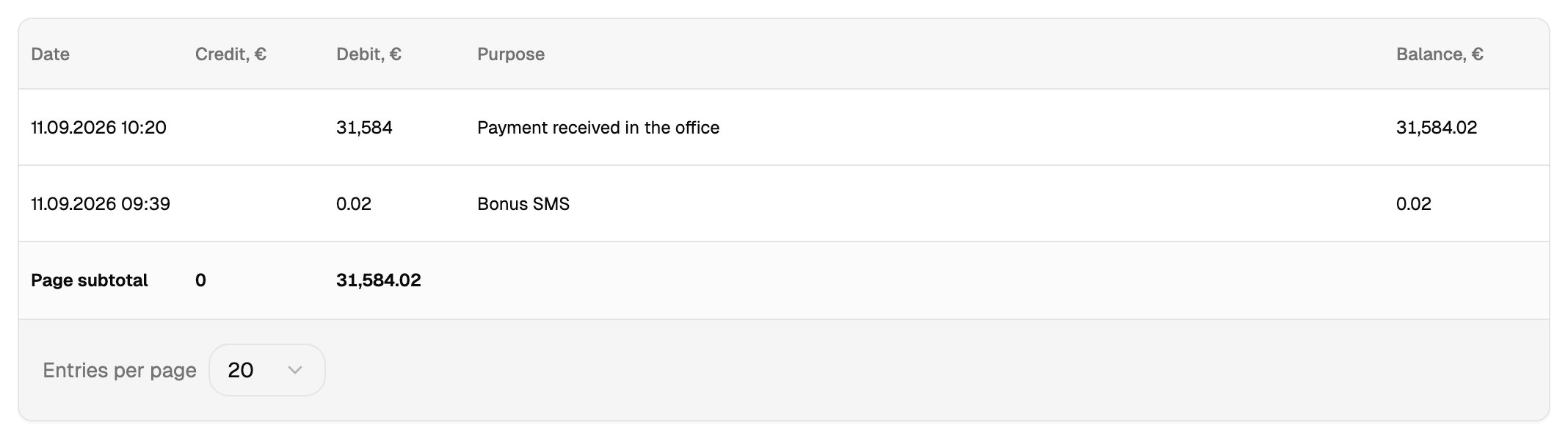
Debit is money in, credit is money out
Debit is an arrival: a top-up, a correction in your favour. Credit is a spend: a campaign, a check, a surcharge.
The words come from accounting, where they mean exactly this — read them that way rather than as "debt" and "credit card". A campaign you sent is in the credit column.
The purpose column
The purpose of an operation is what connects a line of this report to something you did in the cabinet. It is what tells you that this particular spend was that particular campaign.
When you are looking for what a sum went on, the purpose together with the time of the operation is the answer.
The total under the table
The sum shown under the table covers the rows currently on screen. Turning to the next page gives the total for that page.
To get the figure for the whole period, export the report.
Export
The export produces a file for the selected period. For a long period the screen offers to take it in parts, and the parts together cover the whole period.
Checking the balance against your expectation
The report is the place to check, and the order is always the same: find the period, find the operations by purpose, compare with what you expected. A campaign charged as one sum the moment you started it is one line here, one line for the whole campaign.